
Disclaimer: The perspectives shared here are my own and do not necessarily represent those of my employer. I use GenAI as a tool to help me compose and structure my articles.
As a security professional, I often find myself asking: what makes a good threat model? Recently, I had the opportunity to analyse six different threat models for the same system, and the results were fascinating. But before I dive into the comparison, let me set the stage.
What Are We Trying to Do?
Threat modelling is a structured approach to identifying potential security threats, vulnerabilities, and risks in a system. Think of it as a systematic way of answering a key question: what can go wrong and how can I solve it?
The System Under Analysis
In this case, we’re examining a seemingly simple but critical component: a user login screen for an e-commerce platform. Don’t let its simplicity fool you — login systems are often the primary target for attackers and require careful security consideration.
The login screen includes standard elements like email and password fields, a submit button, and some additional features that expand its attack surface: a password reset mechanism, a show/hide password toggle, and rate limiting for failed attempts. All communication happens over HTTPS, and the system provides feedback through error messages.
But here’s the interesting part: how do different security professionals approach threat modeling this system? What makes one threat model more effective than another?
The Evaluation Criteria
To compare these models, I have defined my own evaluation framework. First, I looked at the suggested framework by the LLM response — how well did the threat model follow established methodologies like STRIDE or OWASP? A structured approach isn’t just about following rules; it’s about ensuring we don’t miss critical threats.
Completeness of analysis was another crucial factor. Did the model consider all components, data flows, and trust boundaries? Security isn’t just about individual vulnerabilities; it’s about understanding how different parts of the system interact and where threats might emerge.
Attack vector analysis formed the third pillar of evaluation. How well did each model identify and describe potential attack paths? This isn’t just about listing threats; it’s about understanding how attackers might chain different vulnerabilities together.
The quality of proposed mitigations was equally important. Good threat models don’t just identify problems; they provide practical, effective solutions. Are the suggested controls appropriate? Are they feasible to implement?
Clarity of output might seem less technical, but it’s crucial. Even the most thorough analysis is useless if it can’t be understood and acted upon by developers and stakeholders. How well did each model communicate its findings?
Finally, I evaluated actionability. Can developers take this threat model and immediately start implementing security controls? Are the recommendations specific and practical?
The Models
These are the models I used for the comparison:
- OpenAI — gpt-4o, gpt-o1-preview, gpt-o1-mini
- Anthropic — Claude 3.5 Sonnet
- DeepSeek with DeepThink
- mistral.ai
This is the prompt I used. I intentionally used a very simple (and really bad!) one to see how different models focused on the problem rather than on the instructions. In future posts, I may look into how models respond differently to more elaborated prompts.
I want to find threats for this new feature. Perform a threat model:
User Login Screen for E-Commerce Platform
The product is a web application where users can browse and purchase
various products. To enhance user experience and security, the application
needs a login screen for user authentication. The login screen will include:
1. Email field: A text input field where users will enter their registered
email address.
2. Password field: A text input field for the user's password, masked for
privacy.
3. Submit button: A button that users click to submit their login credentials.
Additional characteristics:
* The login screen will allow users to reset their password via a
"Forgot Password?" link.
* A feature to show/hide the password is implemented for user convenience.
* Login attempts will be limited to prevent brute-force attacks.
* If the login fails, an error message is displayed, such as “Invalid email
or password.”
* The login functionality communicates with the backend API over HTTPS to
validate credentials.
The Results
Here’s how the six models scored across these criteria (on a scale of 1–5, where 5 is excellent):
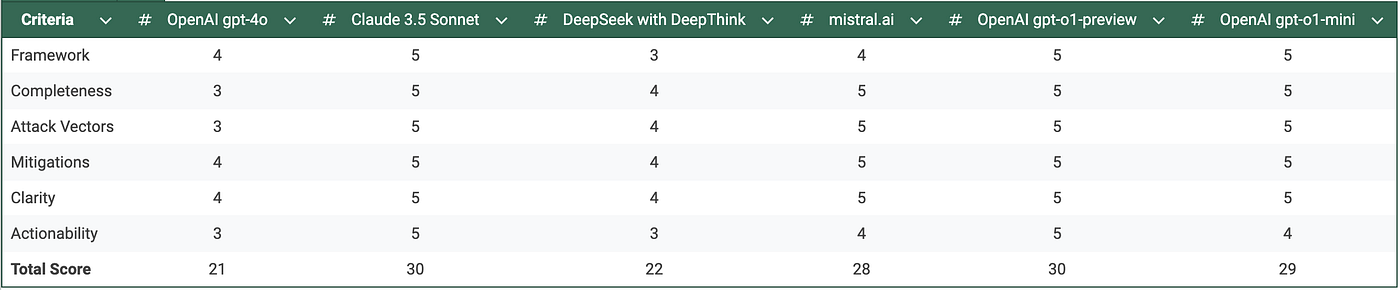
Evaluation of output from different models
The Standout Models
What really impressed me were Claude 3.5 Sonnet and gpt-o1-preview, which both achieved perfect scores but in different ways. Claude 3.5 Sonnet excelled in its practical approach, providing detailed implementation guidance that developers could immediately act upon. Its checklist-based approach to security controls was particularly noteworthy, making it easy for teams to track their progress in implementing security measures.
gpt-o1-preview, on the other hand, impressed me with its comprehensive strategic approach. It didn’t just provide a list of threats and mitigations; it created a complete security framework for the login system. The way it integrated various security aspects — from immediate technical controls to long-term security maintenance — was exceptional.
The Output from the Two Winners
From completeness, this is the output I got from Claude 3.5 Sonnet and from gpt-o1-preview.
- From Claude 3.5 Sonnet:
# Login System Threat Model Analysis

## 1. Spoofing Identity (S)
### Threats:
1. **Credential Stuffing**
   - Attackers use previously leaked username/password combinations
   - Risk Level: HIGH
   - Mitigation:
     - Implement rate limiting per IP/user
     - Use CAPTCHA after failed attempts
     - Monitor for suspicious patterns
     - Enforce strong password policies

2. **Phishing Attacks**
   - Fake login pages mimicking the legitimate site
   - Risk Level: HIGH
   - Mitigation:
     - Implement strict CSP headers
     - Use EV certificates
     - Educate users about URL verification
     - Enable 2FA

3. **Session Hijacking**
   - Stealing session tokens to impersonate users
   - Risk Level: MEDIUM
   - Mitigation:
     - Use secure session cookies (HttpOnly, Secure flags)
     - Implement session timeouts
     - Rotate session IDs after login
     - Bind sessions to IP/device fingerprint

## 2. Tampering (T)
### Threats:
1. **Request Manipulation**
   - Modified API requests to bypass validation
   - Risk Level: MEDIUM
   - Mitigation:
     - Implement strong server-side validation
     - Use request signing
     - Validate all input parameters
     - Implement API versioning

2. **Man-in-the-Middle (MITM)**
   - Intercepting and modifying traffic
   - Risk Level: MEDIUM
   - Mitigation:
     - Enforce HTTPS with HSTS
     - Use certificate pinning
     - Implement proper TLS configuration
     - Regular security scanning

## 3. Repudiation (R)
### Threats:
1. **Login Attempt Denial**
   - Users denying failed login attempts
   - Risk Level: MEDIUM
   - Mitigation:
     - Implement comprehensive logging
     - Use secure audit trails
     - Record IP addresses and timestamps
     - Monitor for suspicious patterns

2. **Password Reset Abuse**
   - Unauthorized password reset attempts
   - Risk Level: HIGH
   - Mitigation:
     - Implement secure reset tokens
     - Add rate limiting on reset requests
     - Send notifications for password changes
     - Maintain reset attempt logs

## 4. Information Disclosure (I)
### Threats:
1. **Error Message Leakage**
   - Verbose error messages revealing system details
   - Risk Level: MEDIUM
   - Mitigation:
     - Use generic error messages
     - Implement proper error handling
     - Log detailed errors server-side only
     - Sanitize all output

2. **User Enumeration**
   - Determining valid usernames through responses
   - Risk Level: MEDIUM
   - Mitigation:
     - Use consistent response times
     - Generic error messages
     - Rate limit username checks
     - Implement account lockout policies

3. **Password Exposure**
   - Insecure password handling/storage
   - Risk Level: HIGH
   - Mitigation:
     - Use strong password hashing (Argon2, bcrypt)
     - Never log or transmit plain passwords
     - Implement secure show/hide password
     - Regular security audits

## 5. Denial of Service (D)
### Threats:
1. **Login Form Flooding**
   - Automated attacks overwhelming the login system
   - Risk Level: HIGH
   - Mitigation:
     - Implement rate limiting
     - Use CAPTCHA systems
     - Deploy WAF protection
     - Monitor traffic patterns

2. **Account Lockout Abuse**
   - Deliberately triggering account lockouts
   - Risk Level: MEDIUM
   - Mitigation:
     - Implement progressive delays
     - Use risk-based authentication
     - Monitor for distributed attacks
     - Implement account recovery process

## 6. Elevation of Privilege (E)
### Threats:
1. **Session Fixation**
   - Forcing users to use known session IDs
   - Risk Level: MEDIUM
   - Mitigation:
     - Generate new session ID after login
     - Validate session origin
     - Implement proper session management
     - Regular security testing

2. **Role-based Access Control Bypass**
   - Exploiting authentication to gain higher privileges
   - Risk Level: HIGH
   - Mitigation:
     - Implement proper RBAC
     - Validate permissions on every request
     - Regular access control audits
     - Monitor for suspicious activity

## Security Controls Checklist

### Frontend Controls
- [ ] Input validation (client-side)
- [ ] CSRF tokens
- [ ] Secure password visibility toggle
- [ ] Clear password field on navigation
- [ ] Disable autocomplete for sensitive fields
- [ ] Implement proper form validation
- [ ] Secure session storage
- [ ] XSS prevention

### Backend Controls
- [ ] Rate limiting
- [ ] Input validation (server-side)
- [ ] Password hashing
- [ ] Secure session management
- [ ] API authentication
- [ ] Error handling
- [ ] Audit logging
- [ ] Access control

### Network Controls
- [ ] HTTPS enforcement
- [ ] TLS 1.3 support
- [ ] Secure headers configuration
- [ ] WAF implementation
- [ ] DDoS protection
- [ ] Network monitoring
- [ ] Regular security scanning

## Recommendations for Implementation

1. **Authentication Flow**
   - Implement OAuth 2.0 or OpenID Connect
   - Add support for 2FA/MFA
   - Use secure password reset flow
   - Implement account recovery process

2. **Security Headers**
   ```http
   Strict-Transport-Security: max-age=31536000; includeSubDomains
   Content-Security-Policy: default-src 'self'
   X-Frame-Options: DENY
   X-Content-Type-Options: nosniff
   Referrer-Policy: strict-origin-when-cross-origin
   ```

3. **Rate Limiting Strategy**
   - Implement per-IP and per-user rate limiting
   - Use exponential backoff for failed attempts
   - Consider implementing request queuing
   - Monitor for distributed attacks

4. **Session Management**
   - Use secure session cookies
   - Implement proper session timeout
   - Regular session cleanup
   - Monitor active sessions

5. **Logging and Monitoring**
   - Implement comprehensive audit logging
   - Set up real-time alerting
   - Regular log analysis
   - Incident response plan
- From gpt-o1-preview:
**Threat Model for User Login Screen of E-Commerce Platform**

---

### **1. Introduction**

The user login screen is a critical component of the e-commerce platform, serving as the gateway for users to access personalized services, make purchases, and manage their accounts. Ensuring the security of this feature is paramount to protect user data and maintain trust in the platform. This threat model identifies potential security risks associated with the login functionality and proposes mitigations to address them.

---

### **2. Assets to Protect**

- **User Credentials**: Email addresses and passwords.
- **Personal Information**: User profiles, purchase history, and payment details.
- **Session Tokens**: Authentication tokens that maintain user sessions.
- **Backend Systems**: APIs and databases that handle authentication and store user data.
- **Application Availability**: Ensuring continuous access to the login service.

---

### **3. Potential Threat Agents**

- **External Attackers**: Unauthorized individuals attempting to gain access.
- **Malicious Insiders**: Employees or contractors with intent to exploit the system.
- **Automated Bots**: Scripts designed for credential stuffing or brute-force attacks.
- **Casual Attackers**: Users attempting to bypass restrictions or exploit vulnerabilities.
- **Eavesdroppers**: Entities intercepting communication between users and the server.

---

### **4. Threat Analysis Using STRIDE Model**

The STRIDE model categorizes threats into six types: **Spoofing, Tampering, Repudiation, Information Disclosure, Denial of Service,** and **Elevation of Privilege**. Each category is analyzed below.

#### **4.1 Spoofing Identity**

**Threats:**

- **Credential Theft**: Attackers use stolen emails and passwords to impersonate users.
- **Phishing Attacks**: Users are tricked into providing credentials on fake login pages.
- **Man-in-the-Middle (MitM) Attacks**: Interception of credentials during transmission.

**Mitigations:**

- **Multi-Factor Authentication (MFA)**: Require a second form of verification, such as a one-time code.
- **Secure Communication**: Enforce HTTPS with strong TLS configurations to prevent data interception.
- **Email Verification**: Confirm new devices or locations via email alerts.
- **Anti-Phishing Measures**: Educate users on identifying phishing attempts and use domain validation.

#### **4.2 Tampering with Data**

**Threats:**

- **Client-Side Manipulation**: Modification of form data before submission.
- **Intercepted Requests**: Alteration of login requests in transit.
- **API Exploitation**: Manipulating API calls to bypass authentication checks.

**Mitigations:**

- **Input Validation**: Implement server-side validation to ensure data integrity.
- **Request Integrity**: Use tokens or digital signatures to verify request authenticity.
- **Obfuscation**: Minimize client-side exposure of sensitive logic.

#### **4.3 Repudiation**

**Threats:**

- **Action Denial**: Users claim they did not perform certain actions (e.g., password changes).
- **Insufficient Logging**: Lack of detailed records to verify user activities.

**Mitigations:**

- **Comprehensive Logging**: Record user actions with timestamps, IP addresses, and device information.
- **Audit Trails**: Maintain tamper-evident logs to verify actions.
- **Legal Notices**: Inform users of logging practices in terms of service.

#### **4.4 Information Disclosure**

**Threats:**

- **Sensitive Data Exposure**: Leakage of user credentials or personal data.
- **Detailed Error Messages**: Providing attackers with information about valid emails or system structure.
- **Auto-Complete Features**: Browsers storing and displaying user credentials.

**Mitigations:**

- **Generic Error Messages**: Use non-specific messages like "Invalid email or password."
- **Secure Storage**: Hash passwords with strong algorithms (e.g., bcrypt, Argon2) and salts.
- **HTTP Security Headers**: Implement headers like `X-Content-Type-Options` and `X-XSS-Protection`.
- **Disable Auto-Complete**: Use `autocomplete="off"` for password fields.

#### **4.5 Denial of Service (DoS)**

**Threats:**

- **Brute-Force Attacks**: Automated attempts to guess passwords.
- **Resource Exhaustion**: Overloading the server with login requests.
- **Account Lockout Abuse**: Maliciously triggering account locks.

**Mitigations:**

- **Rate Limiting**: Restrict the number of login attempts per IP address or account.
- **CAPTCHAs**: Require human verification after failed login attempts.
- **Progressive Delays**: Introduce increasing delays between failed attempts.
- **Monitoring and Alerts**: Detect and respond to unusual activity patterns.

#### **4.6 Elevation of Privilege**

**Threats:**

- **Privilege Escalation**: Gaining higher access rights than intended.
- **Session Hijacking**: Taking over active user sessions.
- **Unprotected APIs**: Accessing backend functionalities without proper authorization.

**Mitigations:**

- **Access Control Checks**: Verify user permissions on every request.
- **Secure Session Management**: Use secure cookies with `HttpOnly` and `Secure` flags; implement session timeouts.
- **Input Sanitization**: Prevent injection attacks that could alter privilege levels.
- **Up-to-Date Libraries**: Regularly update dependencies to fix known vulnerabilities.

---

### **5. Additional Features Threat Analysis**

#### **5.1 "Forgot Password?" Functionality**

**Threats:**

- **Unauthorized Password Resets**: Attackers reset passwords using known emails.
- **Token Interception**: Reset links or tokens are intercepted in transit.

**Mitigations:**

- **Tokenization**: Use secure, random tokens for password reset links.
- **Expiration**: Set short validity periods for reset tokens.
- **Verification**: Require users to answer security questions or provide additional verification.
- **Secure Communication**: Send reset links over HTTPS and encourage users to check for secure connections.

#### **5.2 Show/Hide Password Feature**

**Threats:**

- **Shoulder Surfing**: Exposed passwords can be seen by others nearby.
- **Malicious Scripts**: Exploitation of the feature through cross-site scripting (XSS).

**Mitigations:**

- **User Control**: Default to hidden passwords; users must opt to show the password.
- **Session-Based Protection**: Prevent scripts from toggling password visibility without user interaction.
- **Content Security Policy (CSP)**: Implement CSP headers to mitigate XSS attacks.

---

### **6. Vulnerability Considerations**

- **Cross-Site Scripting (XSS):**
- **Threats**: Injection of malicious scripts via input fields.
- **Mitigations**: Sanitize all user inputs; encode outputs; implement CSP headers.

- **Cross-Site Request Forgery (CSRF):**
- **Threats**: Unauthorized actions performed on behalf of authenticated users.
- **Mitigations**: Use anti-CSRF tokens; verify origin headers; implement SameSite cookies.

- **Cookie Theft:**
- **Threats**: Session cookies intercepted and used to hijack sessions.
- **Mitigations**: Set cookies with `HttpOnly` and `Secure` flags; use session timeouts.

- **Local Storage Vulnerabilities:**
- **Threats**: Storing sensitive data in local storage accessible via JavaScript.
- **Mitigations**: Avoid storing sensitive information client-side; use secure cookies.

---

### **7. Recommendations**

#### **7.1 Implement Strong Authentication Mechanisms**

- Enforce password complexity requirements.
- Encourage or require the use of MFA.
- Regularly prompt users to update passwords.

#### **7.2 Enhance Error Handling**

- Use consistent and generic error messages.
- Log detailed error information server-side for debugging.

#### **7.3 Strengthen Backend Security**

- Secure APIs with authentication and authorization checks.
- Regularly update and patch software components.
- Conduct security audits and penetration testing.

#### **7.4 Educate Users**

- Provide guidelines on creating strong passwords.
- Offer security tips during the login process.
- Inform users about recognizing and reporting phishing attempts.

#### **7.5 Monitor and Respond**

- Implement intrusion detection systems (IDS) and intrusion prevention systems (IPS).
- Set up alerting mechanisms for suspicious activities.
- Have an incident response plan in place.

---

### **8. Conclusion**

By systematically analyzing potential threats associated with the user login screen and implementing the recommended mitigations, the e-commerce platform can significantly enhance its security posture. Protecting user credentials and personal information is essential for maintaining user trust and complying with data protection regulations.

---

**Note:** Security is an ongoing process. It's important to continually assess and update security measures in response to emerging threats and vulnerabilities.
Conclusion
Imagine a world where threat modelling isn’t a separate security exercise but an integral part of your development pipeline. The analysis I’ve shared today is just the beginning. I envision an automated system where you describe your component — like our login screen — and an AI-powered tool immediately generates potential threat models following the best practices we’ve identified. But it doesn’t stop there. The system would track your code implementation, generate the unit tests your code need to pass, then automatically test whether your mitigations actually address the identified threats, and generate compliance reports for audit purposes. This isn’t just about making security easier; it’s about making it inherent to the development process.
The future of security isn’t just about better threat models — it’s about seamlessly integrating them into our development lifecycle in a way that makes security as natural as writing code. What do you think about this vision? How would automated threat modelling change your development process?